Introduction: A Mechanical Masterpiece on Your Wrist
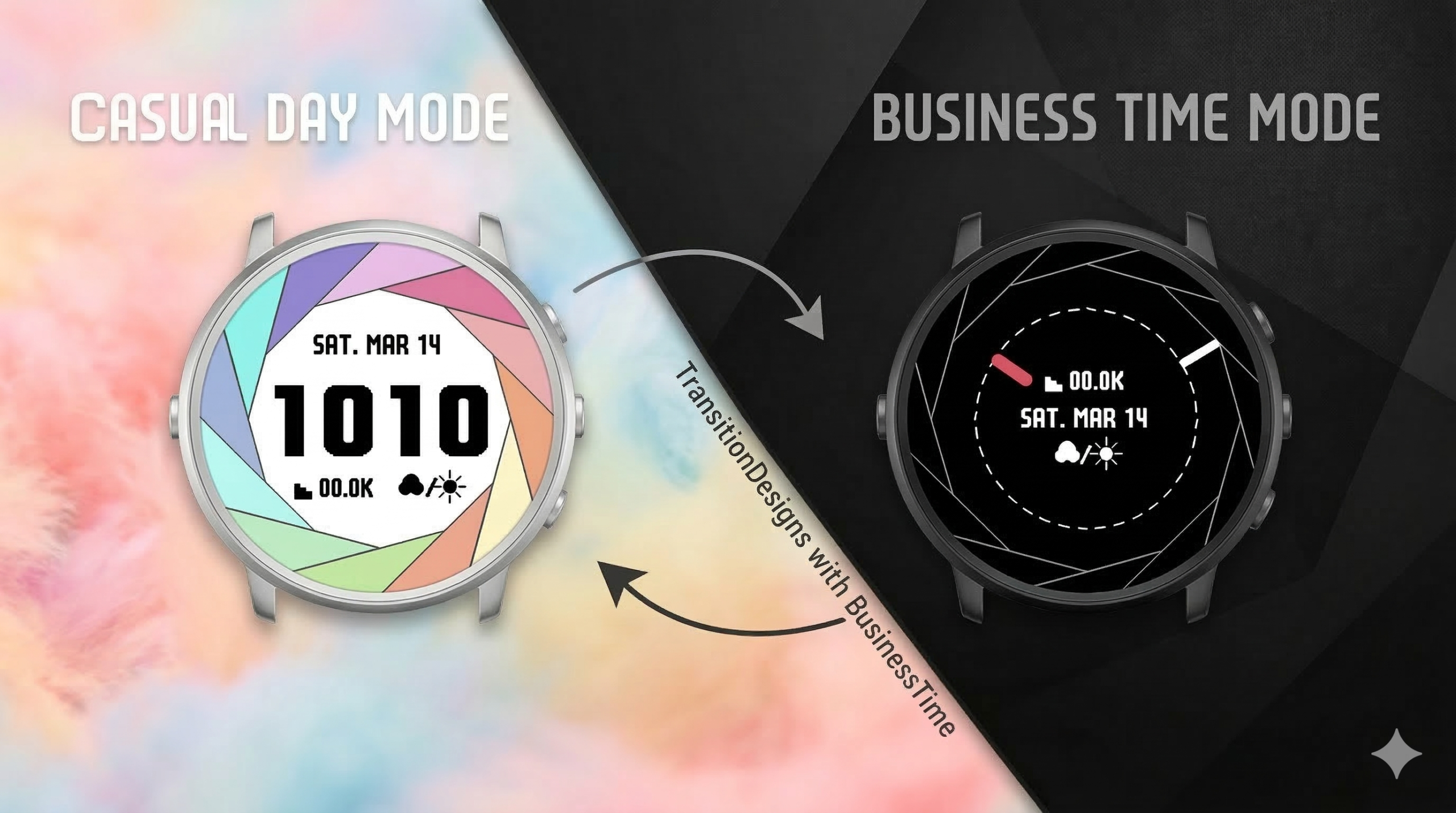
Meet Iris, a Pebble watch face inspired by the stunning mechanical shutter of a camera. Iris elegantly merges the worlds of analog and digital timekeeping, packing both displays into a single, beautifully animated experience. With its smooth shutter animations and unique smart features. Iris is more than just a watch face—it’s a sophisticated transformation tool for your Pebble. Allowing you to seamlessly switch between a casual and a professional look directly from your wrist, no smartphone required.
This guide will walk you through every feature and setting of Iris, ensuring you get the most out of your new favorite watch face.
For those who aren’t quite sure what the “Business Time” feature is: as shown in the video included in this X post, it is a function that changes the watch’s design when you switch to “Quiet Time” mode.
Getting Started: Accessing settings
To fully experience the magic of Iris, you’ll want to explore the settings menu. You can access it through the standard Pebble app (or Rebble app) on your smartphone. Navigate to the Iris watch face and tap the settings gear icon.
Key Feature Guide
Mastering the ‘Iris’ Shutter Animation
The heart of Iris is its beautiful aperture animation. Here’s how you can customize it:
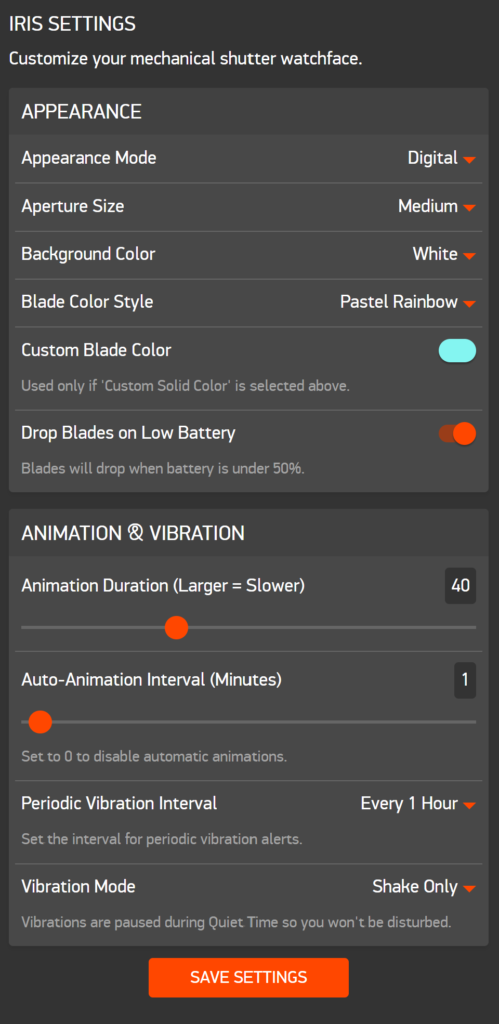
- Appearance Mode: Choose between a crisp Digital time display or an elegant Analog clock face.
- Aperture Size (Blade Width): Select Wide for a bolder look or Medium for a more subtle shutter effect.
- Animation Speed & Frequency: Adjust how fast the blades open and close, and set the Auto Shutter Frequency to make them automatically perform the animation periodically.
The Ultimate ‘Business Time’ Auto-Transform
Setting it up:
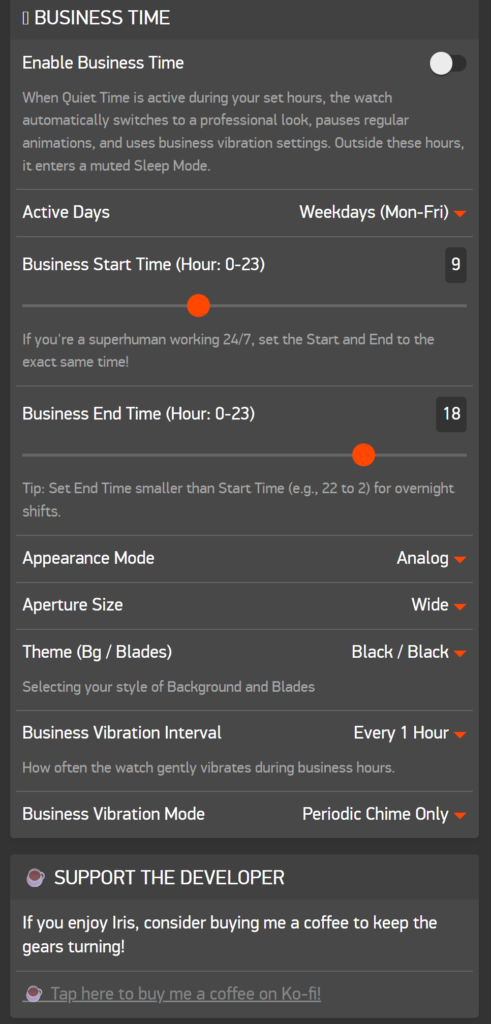
- In the Iris settings, check the Enable Business Mode box.
- Set your Business Start and Business End times (in hours, 0-23).
- Pro Tip (The Superhuman Trick): Are you a 24-hour working superhuman? Set the Start and End to the same time to keep Business Mode on forever!
- Choose which Days of the Week you consider your business days. Iris is smart—it seamlessly handles day-crossing (e.g., if you work from 5 PM to 5 AM) and weekend logic.
Using Smart Periodic Vibrations
Stay perfectly on track without constantly checking your watch. Iris can provide gentle periodic vibrations.
- Vibe Frequency (Interval): Set how often you want to be alerted (e.g., every hour, every 20 minutes, etc.).
- Vibe Mode: Configure when the vibration happens. You can choose to have it only at the defined intervals, or when it aligns with the auto shutter.
Iris handles Business Time cleverly: Your periodic vibrations will only occur during Business Time if Pebble’s Quiet Time is active.
Customization and More
🔋 Visual Battery Indicator: Drop Blades on Low Battery
Keep an eye on your charge in style! When you enable this feature, the watch face cleverly acts as a visual battery meter. Once your Pebble’s battery drops below 50%, the shutter blades will begin to “drop” (disappear or turn gray) one by one as the power decreases. It’s a beautifully subtle and creative way to know when it’s time to recharge.
Special Thanks
This watch face wouldn’t be possible without the incredible contributions from:
- Fonts: Huge thanks to the creators of the Teko Font (by Google) and the 8y12pxDenkiChip font (by 患者長ひっく氏) for giving Iris its unique personality. ※1
- AI Partner: A special thanks to Google Gemini for the amazing coding, debugging, and brainstorming support throughout the development process! 🤖🤝
Conclusion: Download and Support
Iris is ready to transform your Pebble experience. Whether you’re a professional looking for a focused work face or a photography enthusiast who loves mechanical beauty, Iris has something for you.
If you love Iris and want to keep the mechanical gears turning, consider supporting the development! Your support means the world to independent developers.
- ☕️ Support the Developer with a Coffee!
- 🐦 Follow me on X for updates and more projects!


コメント