日本語版はこちらから
Introducing “Iron” – New GPS tracking app for Pebble – 日本語 | はぐの秘密基地
1. Introduction: Memories of Pebble and current situation
Smartphones equipped with the latest Android OS… they’ve evolved incredibly over the past few years.
I still clearly remember the day I ran my first marathon wearing the Original Pebble and using Runkeeper.
The reflective LCD that was easy to read even in bright sunlight, and above all, the “physical buttons” that allowed for reliable, blind operation even with sweaty hands. That experience was truly the best.
However, things changed drastically after Pebble Technology was acquired by Fitbit.
Of course, thanks to the amazing efforts of Rebble, the Pebble hardware itself survived and we could keep using it.
But the companion apps that integrated with it disappeared one after another.
And the ecosystem isn’t the only thing that changed. It’s been about 10 years since Pebble Tech dissolved. Sadly, us users have all aged 10 years too… our bellies stick out a bit more, and our eyesight isn’t what it used to be.
I didn’t want to become the kind of person who just complains, “Why isn’t there a feature for this?” or “I wish it could do that.” More than anything, I wanted to bring back that amazing experience of running my first marathon.
So, through a lot of trial and error, I started building a new Android companion app for Pebble with my own two hands.
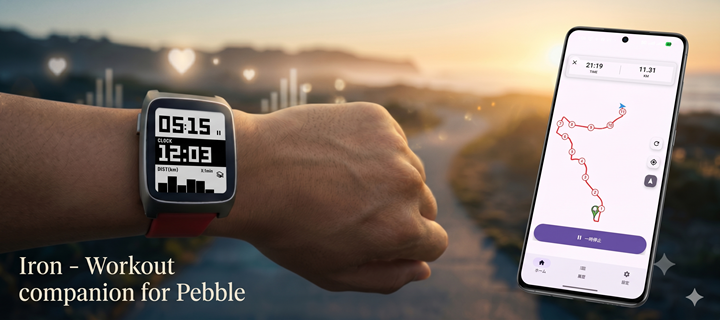
That app is the GPS tracker I’m introducing today: Iron.
Iron – Companion for Pebble – Google Play のアプリ
I know perfectly well that the Pebble community won’t be satisfied with just a basic GPS tracking app (because I’m a massive Pebble fan myself!).
So, I packed this app with a few “fun features.”
I started working on it on April 16th 2026.
2. Control Your Entire Workout with Just Your Wrist
Before getting into specific features, let me clarify the target audience.
This app is for “Android users” who “carry their smartphones” and “wear fully wireless earbuds” during workouts like running, cycling, or walking. Unfortunately, it won’t satisfy the wild ones who want to run shirtless with nothing but a built-in GPS smartwatch. If that’s you, please consider a Garmin.
Instead, the thing I prioritized most when developing Iron was “an experience where you never take your smartphone out of your pocket from start to finish.”
Taking out your phone before a run, opening an app, waiting for a GPS signal… that whole process is pretty annoying. With Iron, everything is handled via wrist operations.
- Prep: Choose your activity (running, etc.) from the watch and start the “GPS Search”. Your phone stays in your pocket. If it’s the same activity as last time, you don’t even need to select it again.
- Confirm: When the GPS locks, your wrist will give a satisfying buzz. Confirm the “READY” screen and hit start.
- Focus: Checking your laps while running or pausing at a red light—with physical buttons, you can do it reliably just by feel, without looking at the screen.
- Finish: Even when you hit “Save” after your run, you still don’t touch your phone.
Thinking back about 10 years ago, the experience of integrating Runkeeper with the Original Pebble or Pebble Time Steel was phenomenal. Knowing your pace and elapsed time right on your wrist, and operating it flawlessly with physical buttons. I think that sense of unity is what allowed me to finish my very first marathon.
But, looking back on that grueling first marathon while gasping for air, I actually had a minor complaint.
First, to start a workout, you had to launch the Runkeeper app from your smartphone. That meant you absolutely had to operate your phone at the beginning. Also, Pebbles back then had music control features, of course. But to change a track, you had to exit the sports app, switch to the music app, skip the song, and then switch back to the sports app. (And I was already out of breath!)
These are the “slightly annoying” memories nestled within an otherwise perfect experience—things I only realized because I ran a full marathon wearing a Pebble. Actually, these minor frustrations and memories are exactly what inspired the “fun features” in Iron.
3. Switch the Info You Want to See: A 3-Tier Watch Screen
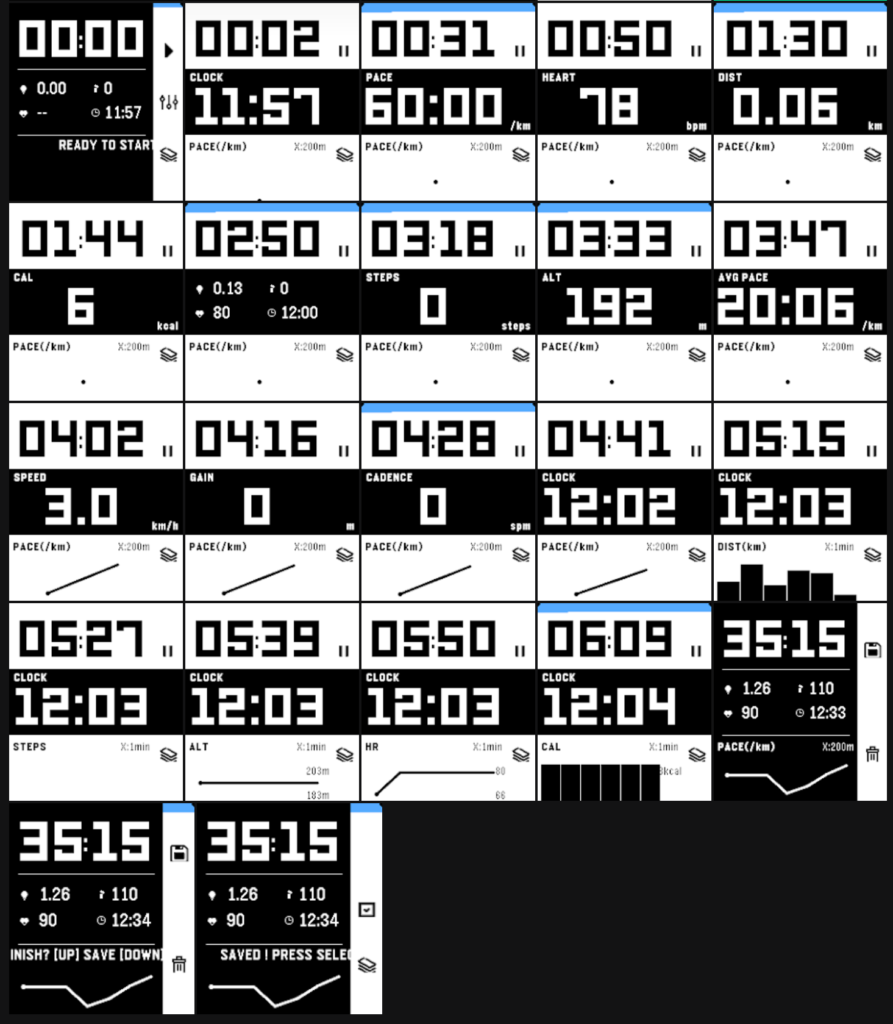
The data you want to see during a marathon varies from person to person, and depends on the situation. Therefore, the Iron watch app uses a simple, highly visible 3-tier layout: Top, Middle, and Bottom.
Fundamentally, the watch app is strictly dedicated to displaying data sent from the Android side.
■ Top: Elapsed Time The top space always displays the time elapsed since the workout started.
■ Middle: Main Data Display (Swap with SELECT button during a workout) This is the largest area in the center of the watch. You can freely cycle through up to 12 data metrics (pre-selected on your phone) while running by pressing the SELECT button on the right side of the Pebble.
- Current Pace (PACE): Your current pace (minutes per 1km/1mile).
- Distance (DIST): Total distance moved since the workout started.
- Steps (STEPS): Total steps taken during the workout.
- Altitude (ALT): Current elevation above sea level.
- Heart Rate (HEART): Real-time heart rate (BPM).
- Calories (CAL): Cumulative calories burned.
- Average Pace (AVG PACE): Your average pace for the whole workout.
- Speed (SPEED): Current movement speed (km/h or mph).
- Clock (CLOCK): Accurate current time.
- Elevation Gain (GAIN): Cumulative elevation gained during this workout.
- Cadence (CADENCE): Steps per minute (SPM). Displays a stable, recent value.
- 4-Split Screen: Condenses 4 vital metrics—Distance, Steps, Heart Rate, and Time—into one single screen.
■ Bottom: Real-time Statistical Graph The bottom space displays a visual graph linked to the data in the middle section. This is also drawn using data calculated and sent by the phone.
- Pace / Speed Graph (Distance-based): Visualizes pace changes based on your “location” on the course.
- Distance Graph (Time-based): Shows how much distance you’ve covered over time.
- Steps Graph (Time-based): Helps you check the stability of your pitch (rhythm).
- Altitude Graph (Time-based): Lets you see the inclines and declines of your route at a glance.
- Heart Rate Graph (Time-based): Shows the trend of your exertion levels.
- Calorie Graph (Time-based): Shows the trend of your energy consumption.
💡 A Developer’s Minor Obsessions Let me talk a little bit about the backend design here.
- Calculations on the Phone, Drawing on the Pebble: The Pebble is given the simple role of “drawing the text and graphs sent to it.” Because complex calculations and data thinning are all done on the phone side, it doesn’t burden the Pebble’s small brain or battery, and results are delivered to the watch screen accurately and rapidly.
- Real-time Metric/Imperial Conversion: Switching between kilometers and miles is as easy as changing a setting on your phone. The phone recalculates the values and instantly resends them to the Pebble, so you can use it smoothly without worrying about setting mismatches on the watch.
- Graph Scale (X-Axis) Display: Dynamically calculated labels (e.g., “X:5min”) appear on the screen to show what one tick on the graph represents (how many minutes or kilometers). This ensures you won’t misread the graph’s scale even while running.
4. “Geeky” Pebble Features Born from Marathon Pain
I know very well that the Pebble community won’t be satisfied with a standard GPS tracking app. Why? Because I’m a massive Pebble fan myself! So, I packed Iron with a few “fun features.”
Actually, the ideas for these features were born from that “bitter memory from my first marathon” I mentioned in Chapter 2.
Back then, while running and gasping for air, I desperately wanted to skip a song. But to do that, I had to exit the sports app, open the music app, skip the track, and then return to the sports app. When you’re running at the absolute limit of your stamina, switching apps on your watch screen is incredibly stressful. The intense feeling of “I never want to switch apps while running ever again!” brought the following features to life.
🎵 Intuitive Music Control Without Switching Apps With Iron, you can control your music while keeping the workout screen open! If you have a touchscreen-enabled Pebble, you can control it intuitively with swipe gestures. (Just don’t forget to enable the Pebble OS touchscreen feature and toggle it on in the Android app’s settings tab.) If you don’t like touch controls or have a non-touch model, you can map Play/Pause and Next/Previous track to a “Long-Press” of the physical buttons. You are now completely free from the hassle of jumping back and forth between apps. (Please enable this in the Android app settings tab.)
I was really surprised with seeing works well music control function with touch screen.
🤖 Tasker / MacroDroid Integration If you’re a pro at automation apps, you can broadcast button long-press events as “Intents” to the Android side to trigger any task you like. Depending on your ideas, you can turn your Pebble into the ultimate remote control during your workout.
🎙️ Summon Your Phone’s Voice Assistant If automation apps sound too complicated… no worries! You can summon your phone’s voice assistant directly with a long button press. While running, just long-press and say, “What’s the weather today?” or “Play my playlist.” (By the way, I personally use the new AI “Gemini”, which replaced Google Assistant, as my go-to assistant!)
Furthermore—and I actually just learned this myself—if you ask your assistant, it can even trigger your phone’s default camera! For example, if you say “Take a picture in 10 seconds,” the phone’s camera will automatically launch and take a shot. I think this is insanely useful for taking a group selfie after a run or snapping a quick landscape picture.
(⚠️ Note: Voice input from the Pebble’s built-in microphone is not supported. Please speak your assistant commands into your fully wireless earbuds or directly into your phone’s microphone.)
I came up this idea eventually during I was asking someone being beta tester.
5. Gratitude for Open Source & the Community, and Data Freedom
Truth be told, if the great workout app RunnerUp hadn’t been open-sourced, I absolutely never would have started this development.
It’s a bit embarrassing to admit, but I had zero experience developing Android apps before this. However, when I stumbled upon the GitHub page for RunnerUp, which used to support Pebble, and saw the traces of the “mechanisms to connect with Pebble” left by past developers, I got the push I needed: “Maybe I can actually do this too.” I found the courage to try because I wasn’t starting from absolute zero; I had the wisdom and ingenuity of my predecessors to lean on.
With the utmost respect for the developers of RunnerUp and everyone who contributed to it over the years, I plan to release Iron as open source on GitHub as well.
It was Day3 once installing Android Studio to my laptop. I started feeling it is possible. At this moment, I still thought I try to modify “Runner up”.
Also, towards the end of development, I asked the folks on the Pebble Forums and the Rebble community for help with closed beta testing, and the feedback I received was incredibly helpful. Specifically, features like “TCX file export support” and “Large text display support (we Pebble fans have all aged 10 years too! haha)” were fantastic ideas implemented entirely thanks to the real voices from the community. I want to take this opportunity to deeply thank everyone who helped with the testing.
Finally, the ability to export TCX and GPX files means that “the record of the sweat you shed belongs to you.” Data recorded with Iron can be freely exported and managed/analyzed on your favorite platforms like Strava or Garmin Connect. You can carry your data freely without being locked into a specific app. This is another vital concept I learned from the open-source culture of our predecessors.
6. Conclusion: Future App Prospects and Usage Guides
Ultimately, the reason I built Iron is simply because “I want to continue using my Pebble for a long time to come.”
If there are things Pebble cannot do, it gives users a reason to leave. If users leave, Core Devices won’t make a profit. That could mean the day might come again when I am no longer able to use Pebble.
It might not have the flashiness of the latest smartwatches. But the satisfying click of those physical buttons and the display that is perfectly readable under any harsh sunlight are charms unique to Pebble. As OS versions update and old apps stop working, I wanted to ensure that the Pebble remains a “perfectly usable everyday tool” rather than “a keepsake shoved in the back of a drawer.” That is the thought that kept me going this far.
Now, while the app itself has taken shape, my work isn’t done yet. Looking ahead, there are a few features I’m secretly challenging myself to build.
The first is support for fetching data from HRM (Heart Rate Monitor) devices that broadcast via BLE. Simply put, a feature to grab heart rate data from devices like the “Fitbit Air”. If this becomes a reality, even models without a built-in heart rate sensor like the “Pebble Round 2” should be able to deliver a highly accurate and excellent workout experience. I’m really excited about it.
The second is utilizing the Pebble’s built-in microphone. Currently, the voice assistant feature relies on earbud or phone microphones, but I’m hoping to eventually use the mic on the Pebble itself. I honestly have no idea if it’s technically possible right now, but if I could make it happen… I can only dream.
Also, regarding the “specific installation instructions” and “detailed settings and usage guides” that I didn’t cover in this blog post, I plan to create and publish them sequentially later on!
To be completely honest, I had a bit of an ulterior motive. I thought, “What if Core Devices holds another app contest? If I wait until then to release it, maybe I’ll get something out of it.” However, in the spirit of the phrase “Make Awesome Happen” that JP said at the end of the last contest, I decided to release it right away.
Keeping this motto in my heart, I want to continue growing Iron bit by bit while listening to the feedback from everyone in the Pebble community.
Please look forward to the upcoming guide articles and the official release on Google Play!
If you like this app and would like to support my work, please consider buying me a cup of coffee (or a beer!) from the link below!

コメント